What Smart Shades Are Compatible with Apple Home?
How Motionblinds connects — two paths, full local control
Read this within a minute
What's the news?
- Motionblinds works with Apple Home across two connection paths — Matter and Thread via Eve Motionblinds, and Matter via the Motionblinds Matter Wi-Fi Bridge — both running locally without cloud dependency
- Eve Motionblinds motors connect directly to Apple Home over a local Thread network using Thread border routers such as Apple TV or HomePod — no Motionblinds bridge required
- The Motionblinds Matter Wi-Fi Bridge connects standard motors to Apple Home with QR code setup and no account or registration needed
What you need to know
- Apple Home only supports Matter — there is no cloud-based Wi-Fi bridge path for Apple Home, unlike other platforms
- Eve Motionblinds with built-in Matter and Thread: scan the Matter QR code in the Apple Home app — Apple Home communicates locally over Thread for fast, secure, and reliable control
- Standard Motionblinds motors (Bluetooth or 433 MHz): connect via the Motionblinds Matter Wi-Fi Bridge using QR code scanning — no account or registration required, bridge works fully offline
- Eve Motionblinds requires a HomePod or Apple TV as a Thread border router — these devices also enable remote access when away from home
- Standard motors using the Matter bridge need a Matter controller — any HomePod, Apple TV, or compatible hub qualifies
- Once connected, Apple Home and Siri support open, close, percentage positioning, scenes, and time-based automations including sunrise and sunset triggers
- First-generation Eve Motionblinds motors with HomeKit firmware can be upgraded to Matter over-the-air
Key takeaways
- This article is for homeowners who use Apple Home or Siri and want to know exactly how Motionblinds fits in. Two connection paths exist — both are Matter-based, both run locally, and which one applies depends on whether you choose Eve Motionblinds or standard motors with a Matter bridge.
- Apple Home is the most privacy-focused of the major smart home platforms, and Matter aligns naturally with that approach. Both Motionblinds paths for Apple Home run local control without cloud dependency once set up.
Why Apple Home Users Expect a Different Kind of Integration
Apple Home attracts homeowners who care about privacy, reliability, and tight platform integration. The expectation is that devices work within the Apple ecosystem without requiring separate accounts, cloud logins, or third-party services running in the background.
Matter is the reason Motionblinds integrates cleanly with Apple Home today. The protocol was designed for exactly this kind of direct, local, cross-platform compatibility — and Apple Home has embraced it fully. For Motionblinds, that means two well-defined paths into the Apple ecosystem, both local, both account-free at the Apple Home level, and both controllable by Siri.

Path 1 — Eve Motionblinds: Matter and Thread, the Fastest Local Connection
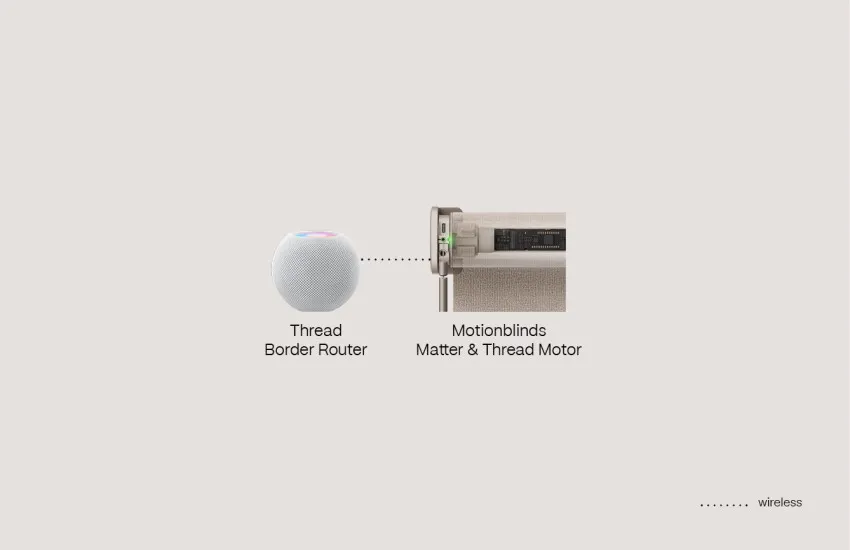
Eve Motionblinds motors have Matter and Thread built directly into the motor. No Motionblinds bridge device is required. To connect to Apple Home, open the Apple Home app, choose Add Accessory, and scan the Matter QR code on the motor — the blind appears in Apple Home immediately and can be placed in a room.
Apple Home communicates with Eve Motionblinds locally over the Thread network. A HomePod or Apple TV acts as the Thread border router, managing the local mesh connection and enabling remote access when you are away from home. Because control runs locally over Thread rather than through the cloud, response is fast and the system continues to operate during internet outages for local automations and timer schedules.
Thread also consumes significantly less power than Wi-Fi, extending the battery life of Eve Motionblinds motors between recharges. For Apple Home users building a local-first, privacy-focused smart home, this is the most capable and future-proof path available.
Path 2 — Motionblinds Matter Wi-Fi Bridge: Standard Motors, Full Apple Home Compatibility
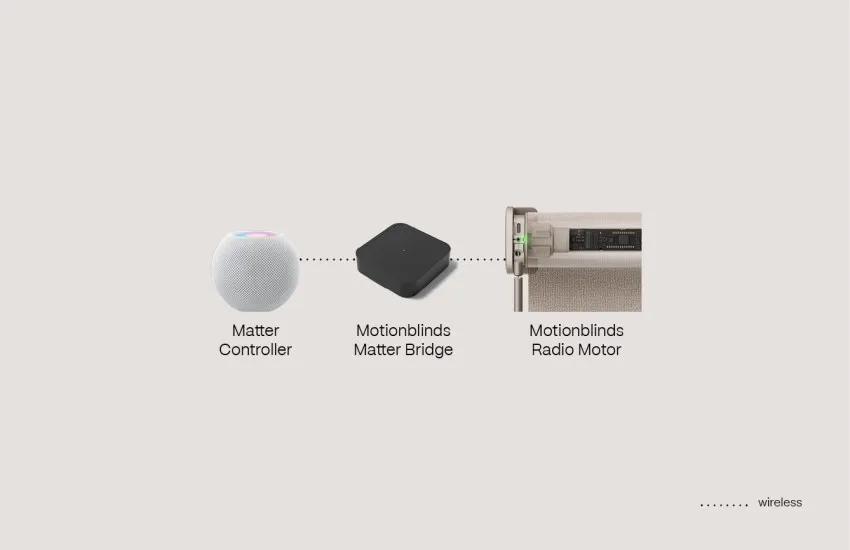
Standard Motionblinds motors using Bluetooth or 433 MHz radio technology connect to Apple Home through the Motionblinds Matter Wi-Fi Bridge. Motors should first be configured in the Motionblinds Matter Bridge app, then added to Apple Home by entering the Matter pairing code from the bridge app into Apple Home.
The Motionblinds Matter Wi-Fi Bridge works fully offline — timer schedules and local automations remain active even without an internet connection. A Matter controller is required: any HomePod or Apple TV qualifies. This path gives existing standard-motor owners full Apple Home and Siri compatibility without replacing their motors.
Note that older Motionblinds Wi-Fi bridges without Matter do not support Apple Home — Matter is the only supported path for Apple Home integration, via either Eve Motionblinds or the Motionblinds Matter Wi-Fi Bridge.
What Apple Home and Siri Can Actually Control
Across both connection paths, the Apple Home and Siri control experience is consistent. Voice commands open, close, or set any blind to a specific position: "Hey Siri, open the living room blinds," "Hey Siri, close all the blinds," "Hey Siri, set the bedroom blind to 50 percent."
Apple Home scenes bring multiple devices together under a single tap or voice command. A "Good Morning" scene can raise every blind in the house, turn on lights, and adjust the thermostat simultaneously. A "Movie Night" scene can close the living room blinds, dim the lights, and set the temperature — all triggered by one phrase.
Apple Home automations support time-based schedules, sunrise and sunset triggers, and automations linked to sensors, lighting, or heating devices. Scheduling blinds to close during peak sunlight hours reduces solar heat gain and can lower cooling usage. Opening blinds to use natural daylight reduces dependence on artificial lighting.
Choosing the Right Path
For new installations, Eve Motionblinds is the stronger choice — Thread delivers the fastest local response, the longest battery life, and the cleanest integration with no bridge hardware required beyond a HomePod or Apple TV already in most Apple Home setups. The Motionblinds Matter Wi-Fi Bridge is the practical choice for homeowners with existing standard motors who want full Apple Home compatibility without replacing hardware.
One important note: existing Bluetooth and 433 MHz Motionblinds motors can gain Apple Home compatibility by adding the Motionblinds Matter Wi-Fi Bridge. First-generation Eve Motionblinds motors with original HomeKit firmware can be upgraded to Matter over-the-air — full instructions are available at support.motionblinds.com/upgrade-to-matter.
Check compatible Thread border router hubs at motionblinds.com/smart-connectivity/hubs, explore full connectivity options at motionblinds.com/smart-connectivity, and find a dealer at motionblinds.com/stores.

FAQ - What Smart Shades Are Compatible with Apple Home?
Yes. Eve Motionblinds with Matter and Thread connect directly to Apple Home. Bluetooth and 433 MHz Motionblinds motors connect to Apple Home via the Motionblinds Matter Wi-Fi Bridge. Both paths use Matter and run locally.
Open the Apple Home app, choose Add Accessory, and scan the Matter QR code — on the motor for Eve Motionblinds. T he blind appears in Apple Home immediately and can be placed in a room. Standard motors should be set up in the Motionblinds Matter Bridge app first. Then, add the bridge to Apple Home by entering the Matter pairing code from the bridge app into Apple Home.
Eve Motionblinds motors require a HomePod or Apple TV because these devices act as Thread border routers and enable remote access. Standard motors using the Motionblinds Matter Wi-Fi Bridge need any Matter controller — a HomePod or Apple TV qualifies.
Yes — Eve Motionblinds motors with built-in Matter and Thread do not require a Motionblinds bridge. Other Motionblinds motors need the Motionblinds Matter Wi-Fi Bridge for Apple Home compatibility.
No. The older Wi-Fi bridge does not support Apple Home. Apple Home requires Matter, which is supported only by Eve Motionblinds motors and Motionblinds Matter Wi-Fi Bridges
Yes. Siri supports commands including "open the blinds," "close the blinds," and "set the blinds to 50 percent." Blinds can be controlled individually, by room, or as part of an Apple Home scene.
Yes. Apple Home supports sunrise and sunset automations, time-based schedules, and automations triggered by sensors, lighting, or heating devices. Motionblinds can be included in any Apple Home automation.
Existing Bluetooth and 433 MHz motors can gain Apple Home compatibility by adding the Motionblinds Matter Wi-Fi Bridge. First-generation Eve Motionblinds motors with HomeKit firmware can be upgraded to Matter over-the-air — instructions are available at support.motionblinds.com/upgrade-to-matter.
Yes. Both Eve Motionblinds and the Motionblinds Matter Wi-Fi Bridge run locally — timer schedules and local automations continue to operate during internet outages. Siri voice commands require an active internet connection.
Related blogposts