KNX
Motionblinds works with KNX
Motionblinds motors are compatible with KNX, the open international standard for building and home automation. Used in commercial buildings, hotels, offices, and residential projects worldwide, KNX enables reliable, decentralized control of blinds, lighting, climate, and more from a single unified system. Motionblinds supports multiple KNX integration paths — from wired Dry Contact and RS485 to Matter over Thread via 1Home — to match the requirements of any installation.
Motionblinds is a smart motorized window covering system developed by Coulisse that works with all leading smart home platforms and building management systems — discover them all here.
What is KNX?
KNX is an open international standard for building and home automation. It is standardized as EN 50090 and ISO/IEC 14543-3, making it the only globally accepted, open standard for residential and building control. KNX is used in commercial buildings, hotels, hospitals, offices, and high-end residential properties across more than 190 countries.
KNX supports the integration of lighting, blinds, heating, ventilation, air conditioning, access control, energy monitoring, and more into a single decentralized system. Each KNX device contains its own intelligence and communicates directly with other devices on the KNX bus — no central controller is required for the system to function. KNX devices from different manufacturers are interoperable.
KNX installations are programmed using ETS (Engineering Tool Software), the standard configuration tool developed by the KNX Association. Installations are carried out by KNX-certified partners and integrators.
KNX supports multiple physical communication layers: twisted pair (TP), IP, powerline (PL), and radio frequency (RF). The most common installation method in commercial projects is KNX twisted pair, where all devices are connected via a two-wire bus.
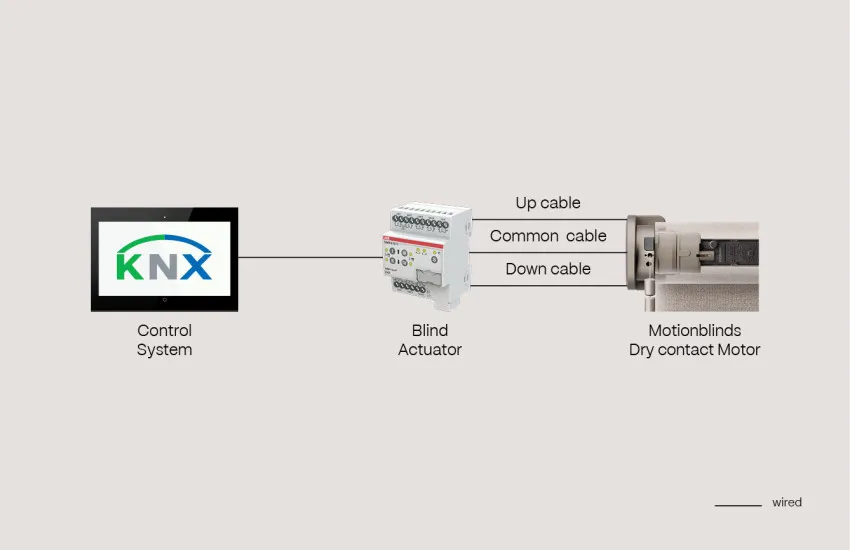
Dry Contact motors
Motionblinds motors equipped with Dry Contact technology connect directly to KNX blind actuators via hardwired inputs. Dry Contact integration provides a wired control path that does not depend on radio frequency, Wi-Fi, or any additional gateway — making it a reliable and widely used option for both new-build and retrofit KNX projects.
Motionblinds Dry Contact motors support four control modes:
• Mechanical mode (default) — operates as a standard wired motor with up/stop/down control.
• Pulse mode — a timed pulse triggers movement; the motor runs until the end position is reached.
• Pulse mode with stop — as above, with an additional stop command supported.
• Single button mode — a single input toggles between up and down.
The control mode is selected to match the output type of the KNX blind actuator. This ensures compatibility with the full range of KNX-certified blind actuators from any manufacturer.
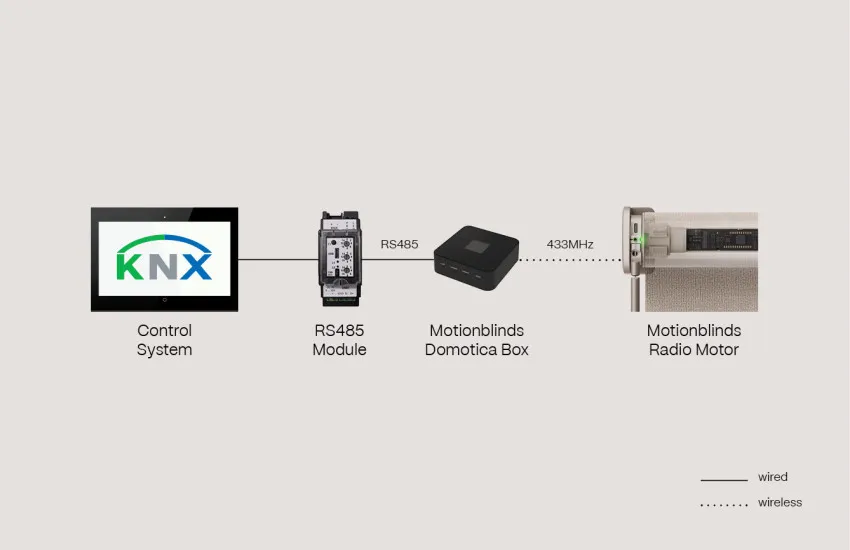
Domotica Box RS485
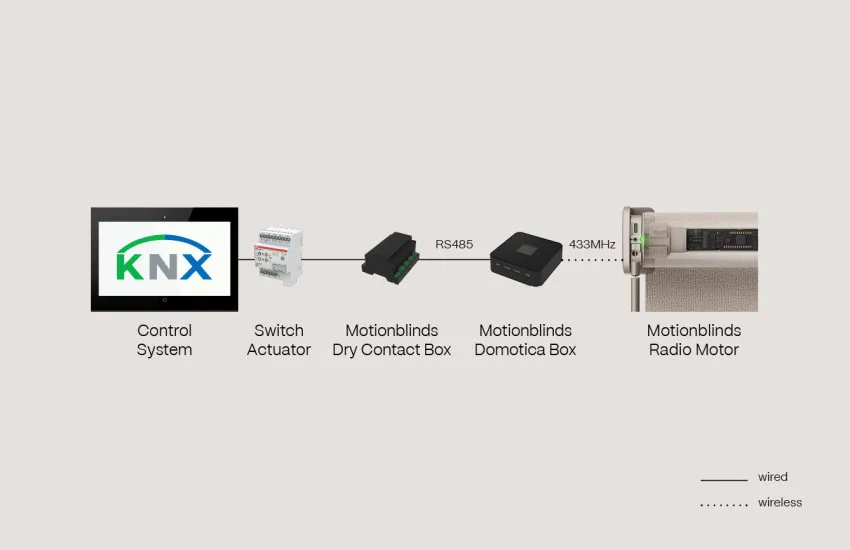
Motionblinds motors with integrated 433MHz radio technology can be controlled via KNX using the Domotica Box CM-19 and an RS485-to-KNX gateway such as the Arcus EDS KNX-GW2-RS485-2TE. The Domotica Box CM-19 is a standalone controller that stores up to 15 preset positions per motor group and communicates with the RS485 gateway over a serial connection. The gateway translates KNX bus commands into RS485 signals, allowing scenes and preset positions to be activated directly from the KNX system.
This integration path supports the full range of Motionblinds 433MHz RF motors — both wired and battery-powered — without requiring any changes to the motor or additional wiring at the motor itself. The Domotica Box is configured once with the desired preset positions and then responds to trigger commands from the KNX system.
Domotica Box + Dry Contact
For KNX installations where a direct RS485 connection is not available or practical, the Domotica Box CM-19 can be combined with the Dry Contact Box CM-29. The Dry Contact Box CM-29 receives trigger inputs from KNX blind actuators, switches, or relay outputs — including KNX-compatible actuators such as the ABB SAH/S 8.6.7.1 — and translates them into scene activation commands for the Domotica Box CM-19.
This combination allows any KNX relay output to activate up to 15 preset blind positions on connected 433MHz RF motors. It provides a reliable integration path for installations where the KNX system does not support RS485 communication directly, and for projects where simplicity of wiring is a priority.
Key characteristics of the CM-19 + CM-29 combination:
• Dry contact trigger input from any KNX relay output, switch actuator, or blind actuator.
• Up to 15 preset positions per motor group, stored locally on the Domotica Box.
• 433MHz RF motors: both wired and battery-powered.
• No cloud connection required — fully local operation.
Mechanical motors
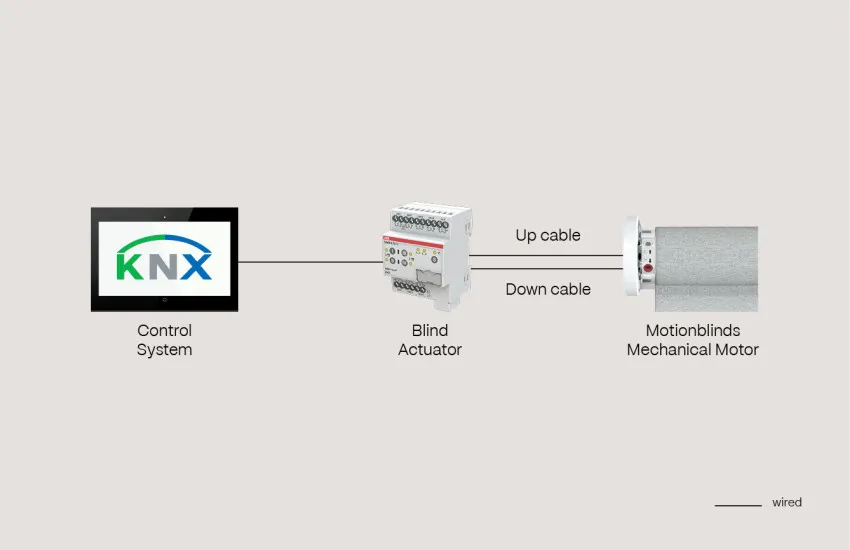
Motionblinds mechanical motors can be controlled directly via KNX blind actuators or shutter switches. Mechanical motors are 120V or 230V AC motors without built-in electronics for positioning or smart home communication, making them a straightforward and cost-effective option for KNX installations where precise intermediate positioning is not required.
Key characteristics of mechanical motor control in KNX:
• Full open and full close operations are fully supported.
• Intermediate stop positions are possible, but cannot be set by precise percentage — the motor runs for a defined time rather than to a measured position.
• In multi-blind installations, small timing variations between motors may affect alignment across adjacent windows.
• Compatible with standard KNX blind actuators, such as the ABB SAH/S 8.6.7.1.
1Home | Matter and Thread motors
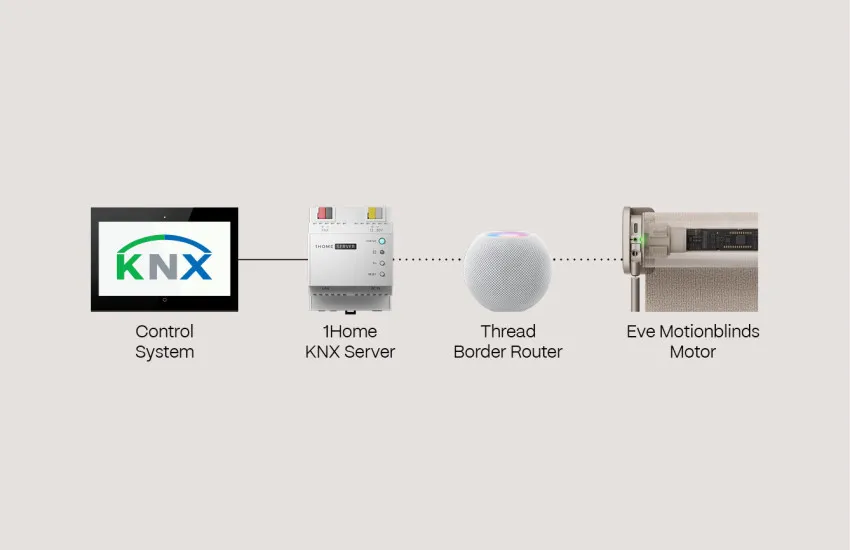
Eve Motionblinds motors with built-in Matter and Thread can connect to KNX installations via 1Home, a KNX-certified Matter controller and Thread Border Router. 1Home acts as a bridge between the KNX bus and the Matter ecosystem: it commissions Matter devices — including Eve Motionblinds motors — and makes them controllable from within the KNX installation, without requiring a separate smart home hub.
The 1Home device connects to the KNX twisted pair bus and simultaneously acts as a Thread Border Router, establishing the Thread mesh network to which Eve Motionblinds wired motors connect directly. Once commissioned, the motors are fully integrated into the KNX system and can be included in KNX scenes, time programs, and sensor-triggered automations. Communication runs entirely over the local network — no cloud dependency is introduced.
Eve Motionblinds wired motors are Full Thread Devices: permanently powered, they act as Thread routers within the mesh, extending network coverage with each motor installed. This makes 1Home + Eve Motionblinds a strong combination for larger commercial or residential projects with many window coverings.
Thread Border Routers already present in the installation — such as an Apple HomePod or Google Nest Hub — can also provide the Thread network for 1Home, removing the need for a dedicated device.
1Home | Matter and Wi-Fi bridges
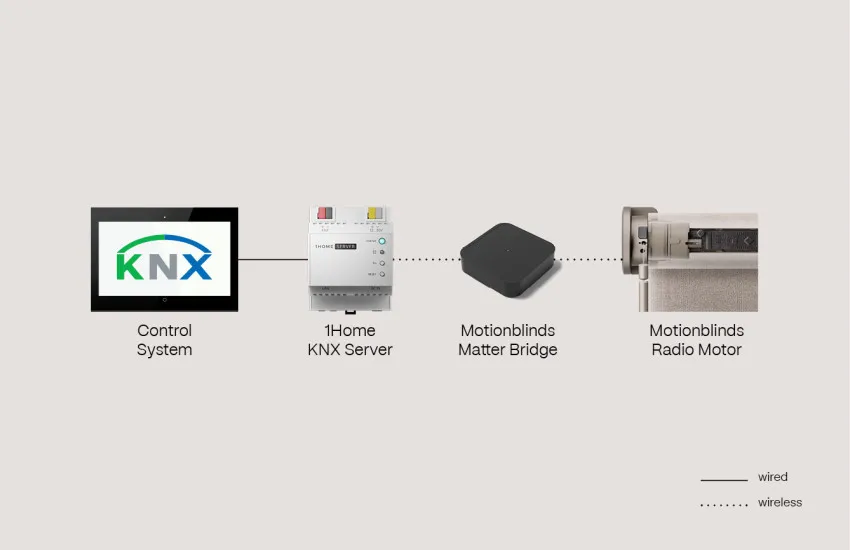
Motionblinds motors using Bluetooth and 433MHz RF technology can be added to a KNX installation via 1Home using the Motionblinds Matter Wi-Fi Bridge. The bridge translates Motionblinds RF and Bluetooth motors into Matter accessories, making them visible to 1Home and allowing them to be incorporated into KNX scenes and automations alongside natively connected devices.
Setup is completed using QR-code scanning — no account or registration is required. The bridge operates fully offline, so blinds remain responsive even when the internet connection is interrupted. This integration path supports the full range of Motionblinds RF motors, both wired and battery-powered, and allows mixed installations combining Eve Motionblinds Thread motors and legacy RF motors within a single KNX environment.
KNX — Frequently asked questions
Yes. Motionblinds integrates with KNX via four methods: (1) Dry Contact motors connected directly to KNX blind actuators; (2) 433MHz RF motors controlled via the Domotica Box CM-19 and an RS485-to-KNX gateway; (3) the Domotica Box CM-19 combined with the Dry Contact Box CM-29 for relay-triggered scene activation; and (4) Eve Motionblinds Matter and Thread motors connected to KNX via the 1Home device.
KNX is an open international standard for building and home automation, standardised as EN 50090 and ISO/IEC 14543-3 and governed by the KNX Association in Brussels. It is used in commercial buildings, hotels, offices, hospitals, and high-end residential projects in over 190 countries. KNX devices from different manufacturers are interoperable through KNX certification.
The Domotica Box CM-19 is a Motionblinds controller that stores up to 15 preset positions for connected 433MHz RF motors and communicates via RS485. It connects to a KNX system using an RS485-to-KNX gateway such as the Arcus EDS KNX-GW2-RS485-2TE, allowing KNX scenes to trigger preset blind positions directly.
The Dry Contact Box CM-29 receives trigger inputs from KNX relay outputs, switch actuators, or blind actuators and translates them into scene activation commands for the Domotica Box CM-19. It is used in KNX installations where a direct RS485 connection is not available, allowing any KNX relay output to control preset Motionblinds positions without RS485 infrastructure.
1Home is a KNX-certified Matter controller and Thread Border Router. It connects to the KNX bus and simultaneously acts as a Thread Border Router, commissioning Matter devices — such as Eve Motionblinds motors — and integrating them into the KNX installation. This allows Matter over Thread motors to be controlled within KNX scenes and automations without a separate smart home hub.
No. 1Home itself acts as both the KNX interface and the Thread Border Router. If a compatible hub such as an Apple HomePod or Google Nest Hub is already present in the installation, it can also provide the Thread network — in that case, a dedicated 1Home device may not be needed for the Thread Border Router function.
Yes. Motionblinds motors using Bluetooth or 433MHz RF can be connected to 1Home via the Motionblinds Matter Wi-Fi Bridge (CM-55). The CM-55 translates these motors into Matter accessories, making them visible to 1Home and enabling integration into KNX scenes and automations.
Yes. Eve Motionblinds wired motors are permanently powered and qualify as Full Thread Devices. Each motor installed acts as a Thread router, extending the mesh network coverage and improving reliability in larger installations — with no additional networking hardware required.
Yes. Motionblinds mechanical motors can be controlled by KNX blind actuators or shutter switches. Full open and close operations are fully supported. Intermediate positions can be achieved by time-based control, but precise percentage positioning is not available for mechanical motors.
Dry Contact integration connects Motionblinds motors directly to KNX blind actuator relay outputs via hardwired inputs — no additional hardware is needed beyond the actuator and the motor. RS485 integration uses the Domotica Box CM-19 as an intermediary, enabling scene-based control of 433MHz RF motors via a KNX-to-RS485 gateway. Dry Contact is simpler and suitable for single-motor or small installations; RS485 is better suited to larger projects requiring preset position management for groups of RF motors.
Yes. All Motionblinds KNX integration methods are designed for professional installation and are suitable for commercial buildings. Dry Contact and RS485 are well-established paths for large-scale projects. The 1Home + Matter over Thread integration adds a modern, cloud-free, IP-based layer compatible with current KNX OS installations in offices, hotels, and multi-dwelling units.
