1Home
Motionblinds works with 1Home.
1Home brings Matter devices and KNX into a single smart home experience. When Motionblinds is connected to 1Home, your smart blinds become part of one unified system that feels natural to use, with control, scenes, and automation all running from the same place.
Motionblinds is a smart motorized window covering system developed by Coulisse that works with all leading smart home platforms and building management systems — discover them all here.
What is 1Home?
1Home is a platform that merges KNX building automation with modern Matter and Thread devices. It gives homeowners and professional installers a shared environment where lighting, climate, shading, and sensors operate together. 1Home communicates locally for fast responses and makes different systems feel like one coherent smart home. Because it supports Matter over Thread, it is well suited for Motionblinds motors using these technologies, especially in advanced installations with KNX.
Matter and Thread motors
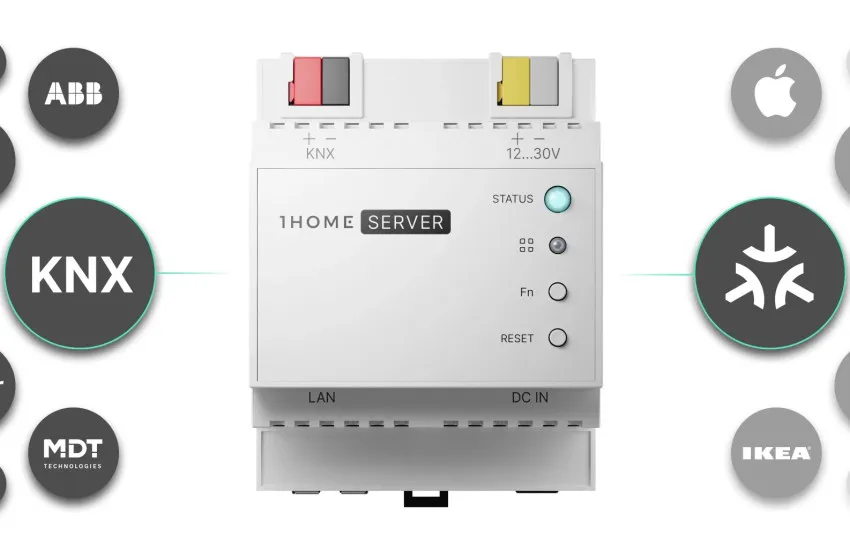
Eve Motionblinds motors with built‑in Matter and Thread connect directly to 1Home through Thread border routers such as Apple TV, Apple HomePod, or Google Nest Hub. No Motionblinds Wi‑Fi bridge is required, because communication runs locally on the Thread network. This setup offers fast performance and reliable control for homes with multiple motors or larger window coverings.
1Home uses the same Thread mesh as your smart home platform, allowing all devices to share the network and improving overall stability. The pairing process is simple with a Matter QR code and avoids cloud dependencies.
Matter and Wi-Fi bridges
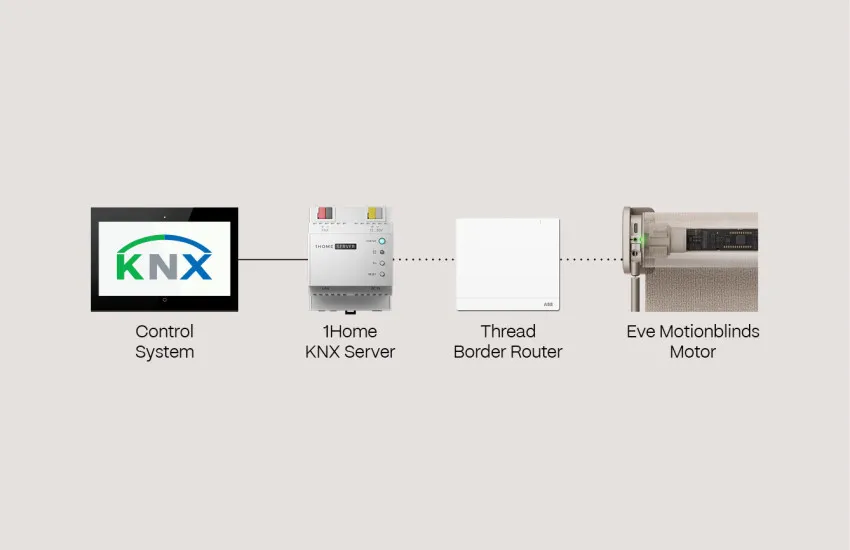
Motors using Bluetooth and 433 MHz can be added to 1Home through Motionblinds Matter Bridges (CM-55). These bridges translate traditional Motionblinds motors into Matter accessories, making them visible to your smart home platform and allowing 1Home to incorporate them into scenes and automations. Setup is quick with QR code scanning, and no account or registration is needed.
The bridges work fully offline, so your blinds remain responsive even when the internet is down. With the Motionblinds Matter Bridge app, installers and homeowners can manage, assign, and organize blinds with ease.
Frequently ask questions - 1HOME
Add your Matter‑enabled Motionblinds motor to your preferred smart home platform with the QR code, then place it on the same Thread network that 1Home uses. Once the motor is discovered, 1Home maps it automatically and makes it available for control and automation. No extra bridge or cloud service is required.
Yes. Eve Motionblinds motors that support Matter over Thread connect directly to 1Home using compatible Thread border routers. All communication remains local, which improves response times and reduces network load.
Eve Motionblinds motors with built‑in Matter and Thread work directly with 1Home. Other Motionblinds motors can be connected through the Motionblinds Matter Bridge (CM‑55), which exposes them as Matter accessories.
You need at least one Matter‑capable Thread border router such as Apple TV, Apple HomePod, or Google Nest Hub. These devices create the Thread network that both 1Home and Motionblinds operate on.
Yes. 1Home merges KNX and Matter devices into one environment so Motionblinds behaves like a native KNX shading device. This makes it easy to include blinds in KNX scenes, schedules, and custom automation rules.
Check that your blind is Matter‑enabled and part of the same Thread network as 1Home. Make sure a Thread border router is online and your motor has the latest firmware. Re‑scanning the network can help in multi‑device installations.
Yes. Matter‑enabled Motionblinds provide live position feedback, allowing 1Home to report open, closed, and percentage values. This supports precise scene creation and automation.
Remote control depends on the app used with your Thread border router, such as Apple Home or Google Home. If remote access is enabled in that app, you can adjust Motionblinds from anywhere while 1Home keeps everything in sync.
If your motor predates Matter or Thread support, an update may be necessary. Use the manufacturer’s app, such as the Eve app, to install updates before pairing with 1Home.
Use a strong Thread mesh with at least one certified border router and keep all devices updated. Installers often recommend placing Thread border routers in open areas and avoiding excessive Wi‑Fi congestion near motors.
