Apple Home
Motionblinds works with Apple Home

With Motionblinds and Apple Home, you can control smart blinds and smart shades directly from the Apple Home app and by voice through Siri. Open your blinds in the morning, close them at night, or set schedules that match your daily routine. Your motorized window coverings add comfort, privacy, and energy efficiency to your home.
Motionblinds is a smart motorized window covering system developed by Coulisse that works with all leading smart home platforms and building management systems — discover them all here.
What is Apple Home?
Apple Home is Apple’s smart home platform for controlling devices such as lighting, thermostats, sensors, and smart window coverings. Managed through the Apple Home app and Siri, it provides a secure and intuitive way to automate devices using Matter and Thread for reliable, local performance.
Matter and Thread motors
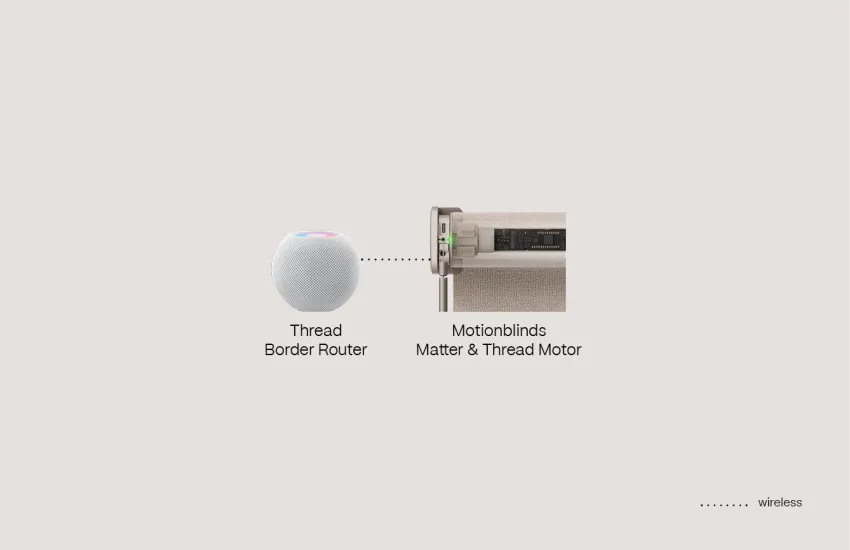
Eve Motionblinds motors with built‑in Matter and Thread connect directly to Apple Home using Thread border routers such as Apple TV or HomePod. No Motionblinds bridge is required. Apple Home communicates locally over the Thread network, providing fast, secure, and reliable control of your smart blinds.
Matter and Wi‑Fi bridges
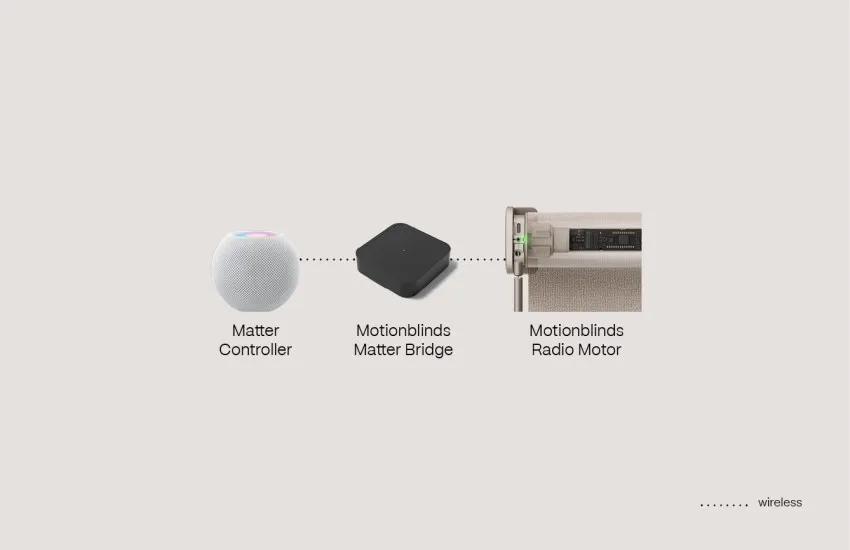
Motionblinds motors using Bluetooth or 433MHz can connect to Apple Home via Motionblinds Matter Bridges. Setup is simple with QR‑code scanning, and no account or registration is needed. The bridges work fully offline, so your blinds remain responsive even without an internet connection. This provides an easy Motionblinds Apple Home configuration for homes with existing motors.
Apple Home - Frequently asked questions
Yes. Eve Motionblinds with Matter and Thread connect directly to Apple Home. Bluetooth and 433MHz Motionblinds motors can be added through the Motionblinds Matter Bridge for full Apple Home compatibility.
Eve Motionblinds motors with Matter and Thread built-in require a HomePod or Apple TV because they act as Thread b or der routers, improve connection reliability, and enable remote access when you’re away from home.
Do you use Motionblinds motors controlled by a Motionblinds Matter bridge? Then all you need is a smart home hub that supports Matter – called a Matter Controller.
Yes. Eve Motionblinds motors with built‑in Matter and Thread do not require a Motionblinds bridge to work with Apple Home. Other Motionblinds motors need the Motionblinds Matter Bridge to work with Apple Home.
Eve Motionblinds connect directly through Thread for fast, local performance. Bluetooth and 433MHz Motionblinds motors use a Matter Bridge, which adds Apple Home support but requires an external device. Both options work locally once set up.
Eve Motionblinds can be added directly using the Matter QR code. Bluetooth and 433MHz motors should first be configured in the Motionblinds Matter Bridge App before pairing with Apple Home.
Open the Apple Home app, choose “Add Accessory”, and scan the Matter QR code on the motor or Matter Bridge. After scanning, you can place the blinds in a room and start automations.
There could be several reasons for this. Quick troubleshooting: Restart your HomePod/Apple TV or reset the Motionblinds motor or bridge and try pairing again. Visit the Motionblinds support center for more detailed answers to your questions.
Yes. Apple Home supports sunrise/sunset routines, time‑based schedules, and automations triggered by sensors, lighting, or heating devices.
Yes. You can group blinds, add them to scenes like “Good Morning” or “Movie Night,” or automate several blinds together for synchronized movement.
Existing Bluetooth and 433MHz Motionblinds motors can connect to Apple Home by using the Motionblinds Matter Bridge. First-generation Eve Motionblinds motors with HomeKit firmware can be upgraded to Matter over-the-air: visit this page for further instructions.
