Z-Wave
Works with Motionblinds

With Motionblinds and Z-Wave, you can bring your blinds into a secure, mesh-based smart home network alongside your locks, sensors, and lighting. Wire a Z-Wave shutter controller behind your Motionblinds motor, and control your blinds locally from any Z-Wave hub — no dedicated Motionblinds bridge required.
Motionblinds is a smart motorized window covering system developed by Coulisse that works with all leading smart home platforms and building management systems — discover them all here.
What is Z-Wave?
Z-Wave is a wireless communication standard built specifically for smart home devices. It uses a low-power mesh network, where each device helps relay signals to extend range and reliability, and is managed through a Z-Wave hub or controller. Because Z-Wave operates on its own dedicated frequency, it avoids interference with Wi-Fi and is widely used for its stability, security, and long device lifespan.

Shelly Wave shutter controllers
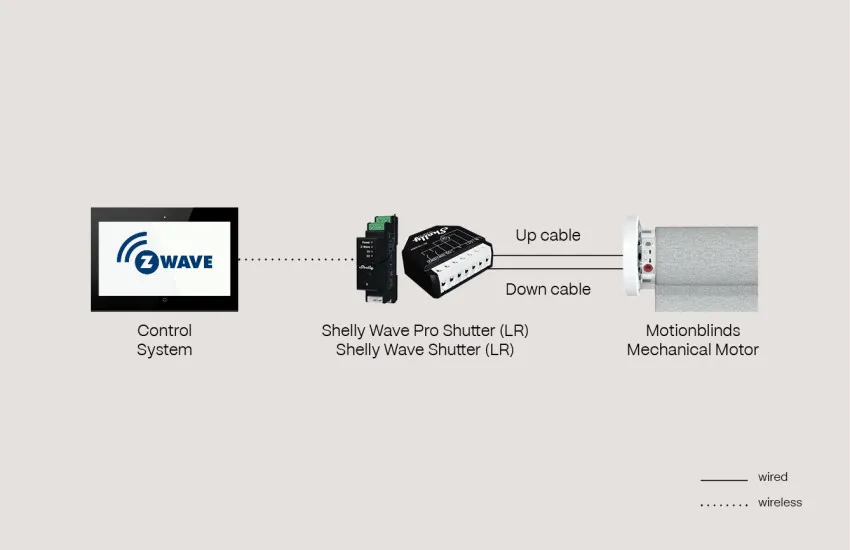
Motionblinds mechanical motors can be wired directly to a Shelly Wave Pro Shutter (LR) or Shelly Wave Shutter (LR) using the motor's up and down cables. The Shelly Wave device then connects wirelessly to your Z-Wave control system, bringing your blinds into the same network as your other Z-Wave devices for shared automations and scenes.
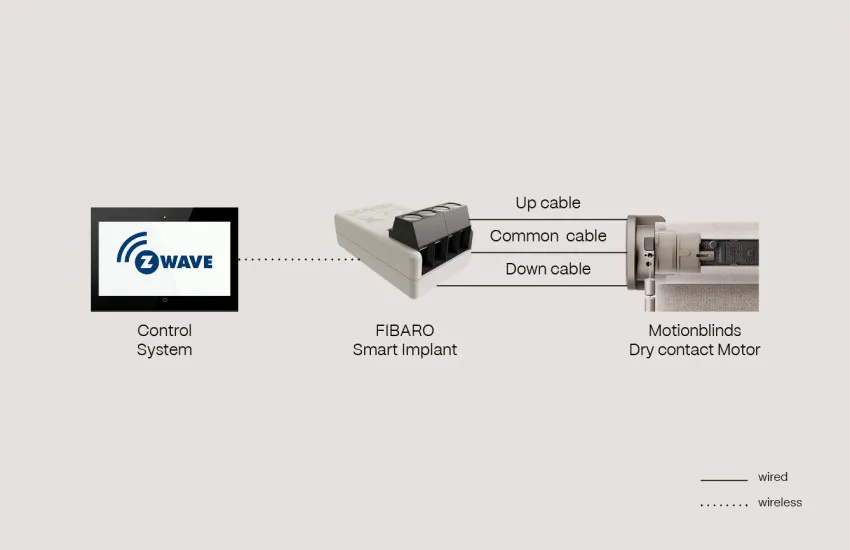
FIBARO Smart Implant
For Motionblinds dry contact motors, the FIBARO Smart Implant offers a compact wired connection using the motor's up, common, and down cables. Once wired, the Smart Implant links wirelessly to your Z-Wave control system, giving you full open, close, and stop control through your existing Z-Wave hub.
Z-Wave – Frequently asked questions
Yes. Motionblinds mechanical motors and dry contact motors can be wired to a Z-Wave shutter controller, such as a Shelly Wave device or the FIBARO Smart Implant, which then connects wirelessly to your Z-Wave control system.
No. The Z-Wave device connects directly to the Motionblinds motor via wired cables, and communicates wirelessly with your Z-Wave hub. A separate Motionblinds bridge is not required.
The Shelly Wave Pro Shutter (LR) and Shelly Wave Shutter (LR) connect to Motionblinds mechanical motors using the motor's up and down cables.
The FIBARO Smart Implant connects to Motionblinds dry contact motors using the motor's up, common, and down cables.
A mechanical motor is wired directly to a shutter controller using up and down cables. A dry contact motor uses an additional common cable, and is compatible with devices such as the FIBARO Smart Implant that are designed for dry contact wiring.
The connection is wired. Depending on your motor type, this uses either an up and down cable connection (Shelly Wave devices) or an up, common, and down cable connection (FIBARO Smart Implant).
The Z-Wave device connects to your Motionblinds motor with a wired connection. The link between the Z-Wave device and your control system is wireless.
Yes. A Z-Wave controller or hub is needed to pair with your Shelly Wave device or FIBARO Smart Implant and manage your blinds alongside your other Z-Wave devices.
Yes. Once your Motionblinds motor is connected through a Z-Wave shutter controller, it can be included in scenes and automations with any other device on your Z-Wave network, such as motion sensors or smart lighting.
There could be several reasons for this. Quick troubleshooting: check the wired cable connections to the motor, confirm the device is included in your Z-Wave network, and check its distance from your hub or nearest mesh device. Visit the Motionblinds support center for more detailed answers to your questions.
Most wired Motionblinds motors can be retrofitted with a Z-Wave shutter controller without replacing the motor itself, using the wiring shown for your specific motor type.
