Homey
Motionblinds works with Homey

With Motionblinds and Homey, you can control smart blinds and motorized window coverings directly from the Homey app, through voice assistants including Siri, Google Assistant, and Amazon Alexa, or automatically through Homey Flows. Schedule your blinds to open at sunrise, close when the temperature rises, or include them in Flows alongside lighting, climate, and security devices. Your motorized window coverings add comfort, privacy, and energy efficiency to any home — fully automated or at your fingertips.
Motionblinds is a smart motorized window covering system developed by Coulisse that works with all leading smart home platforms — discover them all here.
What is Homey?
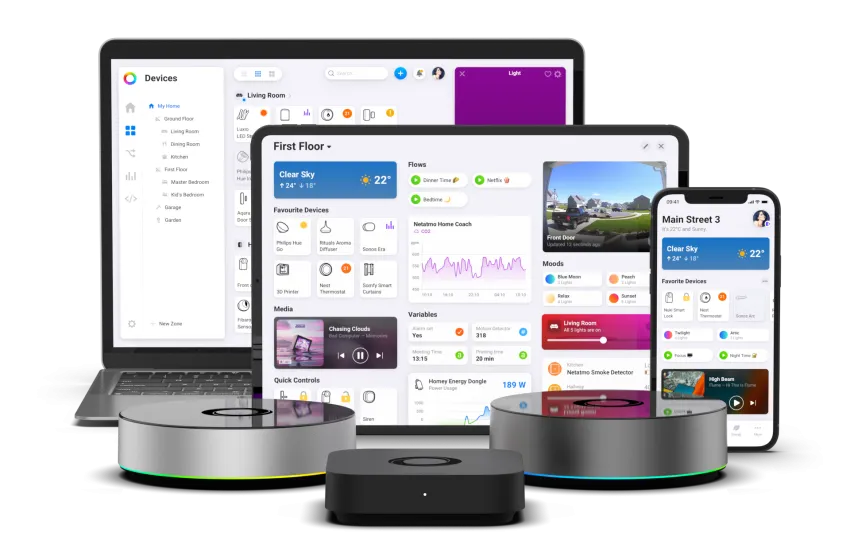
Homey is a smart home platform developed by Athom, a Dutch company. It connects 70,000+ devices from 1,500+ brands into a single app and allows users to control and automate their entire home from one interface. Homey supports a wide range of wireless protocols — including Thread, Matter, Zigbee, Z-Wave, Wi-Fi, Bluetooth, 433 MHz, and infrared — making it one of the most versatile smart home platforms available.
Homey is available as Homey Cloud (app-based, no hardware required), Homey Pro and Homey Pro mini (local smart home hubs with built-in Thread Border Router and Matter Controller). Homey Flows — Homey's automation engine — allow users to create Flows that connect devices across brands, triggered by time, sensors, location, or any other condition in the home.
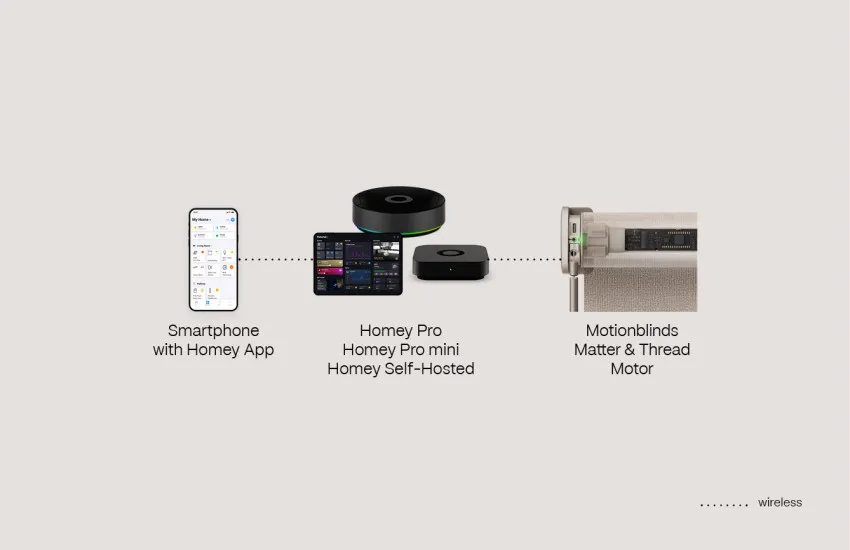
Matter over Thread motors
Eve Motionblinds motors with built-in Matter and Thread connect directly to Homey Pro and Homey Pro mini via Thread. Both have a built-in Thread radio that functions as a Thread Border Router and Matter Controller, so no additional hub — such as an Apple HomePod or Google Nest Hub — is required to establish the Thread network. Homey Self-Hosted Server also supports this integration when a Thread Border Router is present on the network.
Once configured, Homey discovers and commissions Eve Motionblinds motors as native Matter devices. Motors are assigned to zones and can be included in Flows alongside lighting, climate, and security devices, all managed through the Homey app.
Eve Motionblinds motors are available both battery-powered and hardwired. Wired motors are Full Thread Devices: permanently powered, they act as Thread routers within the mesh network. Each motor installed extends the network's reach and redundancy, making larger installations more reliable without requiring additional networking hardware.
When a compatible smart home hub with Thread Border Router capability — such as an Apple HomePod or Google Nest Hub — is already present in the home, it can also serve as the Thread Border Router for Homey's Matter integration.
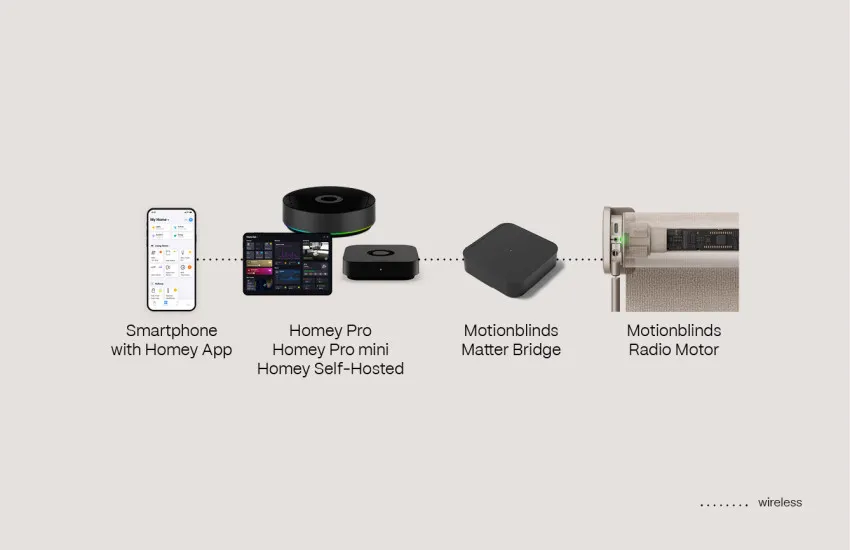
Matter over Wi-Fi bridges
Motionblinds motors with RF 433 MHz and Bluetooth — both wired and battery-powered — can connect to Homey via the Motionblinds Matter Wi-Fi Bridge. This allows mixed installations that combine the full range of Motionblinds motors across a complete home to be managed within a single Homey environment.
Motionblinds Matter Wi-Fi Bridge setup is simple using QR code scanning, and no account or registration is required for the bridge. Homey controls the bridge locally over Matter, so your blinds remain responsive even without an internet connection.
This integration is supported on Homey Pro, Homey Pro mini, and Homey Self-Hosted Server.
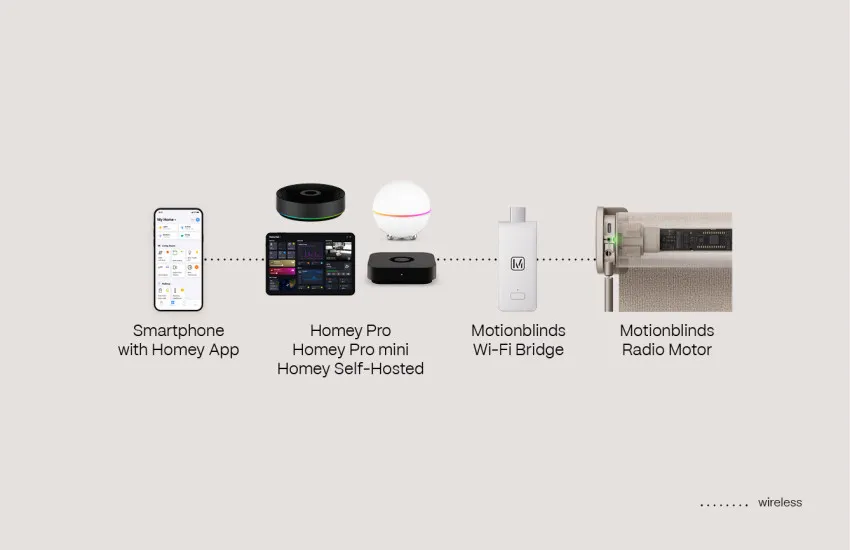
Local API and Wi-Fi bridges
Motionblinds Wi-Fi bridges, both with and without Matter, can connect to Homey directly via a local API. Homey communicates with the Motionblinds bridge over the local network, without routing through the cloud. This means your blinds remain fully responsive and controllable through the Homey app even when there is no active internet connection.
Once linked via the Motionblinds app on Homey, all motors connected to the Wi-Fi bridge are available in Homey and can be assigned to zones, added to Flows, and included alongside other Homey-connected devices. This integration supports the full range of Motionblinds RF 433 MHz and Bluetooth motors — both wired and battery-powered.
The Motionblinds app is available in the Homey App Store.
Homey - Frequently Asked Questions
Homey is a smart home platform by Dutch company Athom that connects 70,000+ devices from 1,500+ brands into a single app. It supports Thread, Matter, Zigbee, Z-Wave, Wi-Fi, Bluetooth, 433 MHz, and infrared, and uses Homey Flows to automate devices based on time, sensors, or any other condition in the home. Homey is available as Homey Self-Hosted Server, Homey Pro, and Homey Pro mini.
Motionblinds connects to Homey in three ways:
- Eve Motionblinds motors with Matter and Thread connect natively to Homey Pro and Homey Pro mini via the built-in Thread Border Router, and to Homey Self-Hosted Server when a Thread Border Router is present on the network.
- Motionblinds RF 433 MHz and Bluetooth motors connect via the Motionblinds Matter Wi-Fi Bridge using Matter over Wi-Fi.
- Motionblinds Wi-Fi bridges connect via a local API through the Motionblinds app on Homey.
Yes. Homey Pro and Homey Pro mini have a built-in Thread radio that acts as a Thread Border Router and Matter Controller. Eve Motionblinds motors with built-in Matter and Thread connect directly to Homey Pro and Homey Pro mini without requiring an additional hub. Homey Self-Hosted Server also supports this integration when a Thread Border Router is present on the network.
No. Homey Pro and Homey Pro mini include a built-in Thread Border Router, so no additional hub is required to establish the Thread network for Eve Motionblinds motors. If a compatible hub is already present on the network, it can serve as the Thread Border Router instead.
Yes. Eve Motionblinds wired motors are permanently powered, qualifying them as Full Thread Devices. Each motor acts as a Thread router within the mesh, extending network coverage and improving redundancy — no additional networking hardware required.
Yes. Eve Motionblinds motors with Matter and Thread connect directly to Homey Pro and Homey Pro mini via Thread. All other Motionblinds RF 433 MHz and Bluetooth motors — both wired and battery-powered — connect via the Motionblinds Matter Wi-Fi Bridge or via Motionblinds Wi-Fi bridges using a local API.
The Motionblinds Matter Wi-Fi Bridge connects to Homey via the Matter standard over Wi-Fi. The Motionblinds Wi-Fi bridges that do not support Matter connect via a local API, with Homey communicating directly with the bridge over the local network. Both options work local and support the full range of Motionblinds RF 433 MHz and Bluetooth motors.
Yes. Homey controls Motionblinds bridges either via Matter or via an API over the local network. No internet connection is required for this integration to function.
The Matter over Thread integration is supported on Homey Pro and Homey Pro mini (built-in Thread Border Router) and Homey Self-Hosted Server (requires a Thread Border Router on the network). The Matter over Wi-Fi bridge integration and the local API bridge integration are compatible with Homey Pro, Homey Pro mini, and Homey Self-Hosted Server.
Yes. Once connected, Motionblinds motors are fully available in Homey Flows. You can create automations that open blinds at sunrise, close them when indoor temperature exceeds a set threshold, include them in Flows with lighting and climate control, or trigger them based on presence, sensors, or any other Homey-supported condition.
Yes. Homey supports the Matter standard, so Eve Motionblinds motors can be managed through Homey and simultaneously accessible in Apple Home, Google Home, Amazon Alexa, or Samsung SmartThings, depending on your setup.
Yes. Homey supports voice assistants including Siri (via Apple Home), Google Assistant, and Amazon Alexa. Once Eve Motionblinds motors or other Motionblinds motors are connected to Homey, they can be controlled via voice commands through any of these assistants.
The Motionblinds app is available in the Homey App Store: https://homey.app/en-us/app/com.motionblinds/Motionblinds/. It enables the Matter and local API integrations for Motionblinds and is compatible with Homey Pro, Homey Pro mini, and Homey Self-Hosted Server.
